2007-04-24

My must have utils - Part 2

This time, I'll write a bit about another of those tools I can't live without: TreeSizePro.
I like to be in control of what's going on on my computer, rather than have it decide what's best for me. That's how I knew that Delphi 2007 PRO's default full install requires 3.6 GB free HDD space, even though there's only around 700 MB worth of CodeGear stuff. Using TreeSizePro it's child's play to find that out: I start by scanning the target hard-drive and Save the report as XML; then, I install the tool(s) I want and finally I run another scan of the hard-drive. When it's done (usually a few seconds), i use the built-in option to compare that snapshot with the previously saved one. And voilá! Couldn't be easier: not only you'll find out how much space that install is using, but, more importantly, where was that space spent... Like, in the above example, 2 GB of cached install files...

Other nice features:
  1. Integrates with explorer, so I can right-click on a folder/drive and run it there;
  2. You can automatically expand/hide all folders above/below a certain threshold;
  3. You can see where your space is going (top 100 files), what types of files use what space, how are your files taking space distributed by file age;
  4. You can see the number of files or space used or percentage of space used;
  5. You can see file usage by users, should you have several users on your computer (also runs on servers);
  6. Schedule scans to occur at some time/date or with a certain frequency;
  7. Export to Excel, HTML, Text, XML;
  8. Search for Biggest/Oldest/Temporary files;
  9. There's even a limited (in functionality) Freeware version if you don't want to spend any money...
And a lot more options. Go there, try it and see for yourself. If you don't want/can't spend money on such a tool, get the free version even though the Personal version is cheap enough not to be without it!... If your drive has limited space or if you just like to know where that space is going, just give it a spin...

[Edit]: Forgot to mention that this one is another one of those utils that I run without installing first: D:\Utils\TreeSize...

Here are a few appetizer images:


My must have utils - Part 1

Well, those who have paid more attention already noted a box with links to some of my must have utilities. However, every now and then I keep referring someone to one of these utils, so I decided to blog a bit about them. Every day or every other day I'll pick one of my must have utils and blog a bit about it. Most are programming related, but then, so much for the better as this blog is about my experiences with Delphi...

Just a small note before starting: I'm doing this about tools I already own, and am not getting paid to do so: I just want to spread the word, as sometimes, for not knowing, we tend to get stuck to old ways of doing things when there are so many nice tools around. Also, I've spent many hundreds of dollars/euros in less than good tools, so if I can help someone else go for the right tools instead, I'll be happy for being of service! :)

Today I'll talk a bit about one that most of you probably already use: SnagIt, from TechSmith.

You can see many examples of SnagIt in my previous blog posts: whenever I need a prtscr, rest assured that it's not the old prtscr that is being used!

You can get the trial from the link above, so I'll just give you some pointers on the features I love in SnagIt:
  1. You can have several shortcut keys for different capture profiles: I use PRT-SCR for a selection capture, SHIFT-PRTSCR for a Window Text Capture and ALT-PRTSCR for a Window Graphics Capture.
  2. Scrolling Window Captures: have you tried to capture the whole list of, say, Delphi 2007 Install Options? Or the Control Panel? "Normal" procedure would be several runs of PRTSCR and some lengthy copy/paste... Not with SnagIt as you have a profile for that! Just select "Scrolling Window", hit PRTSCR, select the window and watch it do it's magic!
  3. Easily blur/dim non-relevant areas: only a few clicks away and you get to draw attention to what you really want to focus on and/or hide sensitive information while still showing the big picture;
  4. Easily add visual clues that the image is only part of what you want to show, again, only a few clicks away;
  5. Easily add captions, arrows, callouts, highlights, stamps, you name it! And by default, they all come with a nice shadow effect that you can disable if you don't like...
  6. You can save the images in a proprietary format but keeping all those arrows, etc, so that you can later move them around, change colors, add/remove new callouts, all without needing to go grab that screen again;
  7. You can capture a full-screen DOS or DirectX application;
  8. You can capture non-rectangular areas or even multiple areas at once;
  9. [EDIT]: Almost forgot this one! You can create your own presets which may include some effects like thorn edges, scaling, color changing and more and assign hotkeys to them too...
And there are plenty other options available! :)

Also, this is one of the utils that I have managed to not-install, i.e., I installed once into my D:\Utils\SnagIt folder and when I re-install my windows in C:, all I need is run it once, register it, set it to auto-run on startup and set my preferences, that is, if I didn't save the %appdata%... :)

Here are a few examples of what can be achieved with SnagIt, but the best thing to do is to try for yourself: soon you'll get used to hit prt-scr, do whatever you need to do to the image *on the spot* and save it: no more prtscr, open graphics editor, paste, manually process image... You'll get quality screenshots in no time, be it to show your customers something or to add to your documentation or a bug report to someone...

Note: these images were done completely within SnagIt's Editor, that is, PRT-SCR, edit, save: no manual retouching in any other editor was done. Also, if I saved in it's native format, I'd be able to later edit/move/replace any of those edits...) (Click them for larger versions)

2007-04-22

RTFM - Read The Forgotten Manual

Actually, it's more about "Read the forgotten Readme"...

Recently, I've had a couple small issues with Delphi 2007 or I tried helping some people with some other smaller issues. It turns out that by simply reading the Readme (not just skimming the topics as I did, but actually reading it!), I could find quite a few answers to quite a few questions/problems!

If you're like me and in time have "forgotten" to read the readme's, try to take them for a spin... :)

BTW: Before someone points out the true meaning of the F in RTFM, I'm well aware of what it is... ;)

Edit: Thks for the comment, Steve. Here's the clickable link for the Updated Delphi 2007 Readme.

2007-04-16

Delphi 2007: Putting a "fat cow" on a diet...

First, for those who don't understand the title, it's a small joke to another blog post which has since been renamed...

In this post, I'll explain to all those hackers around how to install the Delphi 2007 ESD while preserving 2.6 GB of your C: drive. You will require 1.2 GB on another partition, but if you're like me, you'll have those around! :) Still, your total will be 2.2 GB versus the default 3.6 GB and you'll loose nothing important (other than redundantly cached install files and needless .NET help...)

I like to keep my C: drive as lean as possible so as to be viable to make a compressed GHOST image of it and still fit a fully installed and configured working environment on a DVD. This way, I can restore my system to a working condition in around 10 minutes. However, the default way of installing Delphi 2007 simply uses 3.6 GB of C: space! So, I needed to come up with something different. CodeGear is supposedly working on a better install, although it's now a whole month since Delphi 2007 is out and that new installer is yet to be seen, and, even worse, due to SOX, they won't commit on a date for when that's coming out...

So, let me describe this process, which I must say I haven't tested on Vista as I don't use that... It does however work very well in decent versions of Windows such as XP, 2000 or 2003.

There are two main goals that I want to achieve here:
1) Setting up Delphi 2007 while simultaneously keeping it from caching stuff on C:;
2) Improve the help by not returning .NET results and, again, shave some few more MBs from C:.
This 2nd part should only be followed by those not requiring the .NET help for another dev tool, that is, for all those that like myself couldn't care less of .NET and only develop "for Win32".

Step 1: Download the following 3 prerequesites:

1) Microsoft .NET Framework Version 2.0 Redistributable Package (x86)

2) Microsoft Visual J# Version 2.0 Redistributable Package

3) .NET Framework 2.0 Software Development Kit (SDK) (x86)

You should now have the following 3 EXE files:
setup.exe
dotnetfx.exe
vjredist.exe

Step 2: "pre-process" those files.

Using WinZip, 7-Zip or your favorite archiving tool, uncompress all those 3 files (yes, they're self-extracting .ZIP files but we want some control!). Extract the contents of each file onto it's own folder.

You should now have the following 3 folders:

setup
dotnetfx
vjredist

Rename "setup" to a more descriptive "dotnetsdk".

You should save them somewhere where you can access them later, should you want to modify the installations. In this example, we'll be using D:\Install, so move them all over there.

Step 3: Installing the prerequesites.

1) Run "D:\Install\dotnetfx\install.exe"
2) Run "D:\Install\vjredist\install.exe"
3) Run "D:\Install\dotnetsdk\install.exe"
In this last one, select only "Product Documentation": the other two options are not needed.

Q: Why did we uncompress these and "manually" run the MSIs?
A: We're doing this to save you 400 MB of C: space in exchange of a couple minutes of your time!

Q: And how are we saving space?
A: That's what we'll do next!

Step 4: Saving 400 MB of cached files in C:, while still not breaking anything...

Installing those 3 products cached the install files on C:. We will now update the registry to point to the same files in D:\Install, so as to allow you to Remove/Repair apply any security update on any of those products...
Using RegEdit, change the following values:

Start by navigating to here:
HKEY_LOCAL_MACHINE\SOFTWARE\Microsoft\Windows\CurrentVersion\Installer\UserData\S-1-5-18\Components\
Key.....: 5B868AEEE5852414A85EBF681240D704
Value...: D6461317C3DC4F04799BDCE9E42626FE
Old Data: C:\WINDOWS\Microsoft.NET\...\netfx.msi
Set To..: D:\Install\dotnetfx\netfx.msi

Key.....: 521E4F6057E22F94ABD31D61977E7BAD
Value...: 2C951936B72B802498568D0AEABDED2D
Old Data: C:\Program Files\...\netfxsdk.msi
Set To..: D:\Install\dotnetsdk\netfxsdk.msi

Key.....: EF03A325B58ACCF46AD453FC5B8D3A6D
Value...: 2C951936B72B802498568D0AEABDED2D
Old Data: C:\Program Files\...\netfxsd1.cab
Set To..: D:\Install\dotnetsdk\netfxsd1.cab

Key.....: AAC54F5B3FA6B6B45864A1DA921F3C4C
Value...: 34053A86A55C7324889C73EEC136DE17
Old Data: C:\WINDOWS\Microsoft.NET\...\jsredist.msi
Set To..: D:\Install\vjredist\jsredist.msi

Key.....: 0DFA9869D465FA14CAFF90CB479360E9
Value...: 34053A86A55C7324889C73EEC136DE17
Old Data: C:\WINDOWS\Microsoft.NET\...\jsredis1.cab
Set To..: D:\Install\vjredist\jsredis1.cab
You can also delete (but it's not required) the following key:
HKEY_CLASSES_ROOT\Installer\Products\D6461317C3DC4F04799BDCE9E42626FE\SourceList\Net\2
Since the 1st one is set to the correct path, this "2" will be ignored anyway.

By now, you've just lost 1.079 MB. Yep! That's 1 GB of .NET prereqs for a "for Win32" product! :)
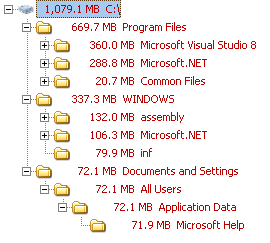
Don't worry, we'll shave some of that now!

Step 4b: "Safe" shaving...

You can now delete the following folders as they're no longer required:
"C:\WINDOWS\Microsoft.NET\Framework\v2.0.50727\Microsoft .NET Framework 2.0"
"C:\WINDOWS\Microsoft.NET\Framework\v2.0.50727\Microsoft Visual J# 2.0 Redistributable Package"
"C:\Program Files\Microsoft Visual Studio 8\Microsoft .NET Framework 2.0 SDK - ENU"

We have now cut down our losses to "only" 685.4 MB...

Step 4c: ".NET Help" shaving: only do this if you don't require .NET help in any development application:
(If in doubt, make a backup of those files elsewhere so as to undo it later...)

Delete the following folder:
"C:\Program Files\Microsoft.NET\SDK\v2.0\Docs\1033"

Delete all files starting with "MS.NETFramework.v20." in this folder:
"C:\Documents and Settings\All Users\Application Data\Microsoft Help"

We have now cut our losses to only 324.8 MB and simultaneously prevented Delphi 2007 from showing unappropriated .NET help...
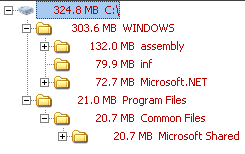

If you have the time, there's a couple hundred registry references to all those files/folders we deleted above: I haven't bothered with deleting/changing them all and all seems to be working just fine. Maybe if one of these days I find myself some free time I'll make a program to automate all that...

Step 5: "A small trick..."
Now for the fun part! :)
  1. Create another user on your computer named "Install" and make it an admin.
  2. Log off your current user account and login to "Install".
  3. Now log off again and back to your "regular" user.
  4. Open RegEdit and navigate to this key:
    "HKEY_LOCAL_MACHINE\SOFTWARE\Microsoft\Windows NT\CurrentVersion\ProfileList"
  5. You'll find a few subkeys like "S-1-5-18", "S-1-5-19", "S-1-5-20", and a few more with much longer names, starting with "S-1-5-21-".
  6. You will find one that has the following value: "%SystemDrive%\Documents and Settings\Install" for the "ProfileImagePath". Change that into "D:\Install\Delphi2007". Don't forget to create the folder too!
  7. Now go into Computer properties->Advanced->User Profiles, select the "Install" profile and use "Copy To".
  8. In the new dialog, browse to the folder "D:\Install\Delphi2007" and in the "Permitted to use" type "Install".
  9. Now delete "C:\Documents and Settings\Install".
  10. Log back on to "Install" and run the Delphi ESD Setup.
  11. Important step:
    when asked where to create the "shortcuts", answer "Just Me". If you choose "All users", you'll break this whole "leaning" process!
  12. Just let the installer run and you'll notice that the cache is now being created in:
    "D:\Install\Delphi2007\Local Settings\Application Data\{AB3EC276-D261-4943-A921-1CC1C6799AED}"
    Note: If you already have downloaded the install files, you can simply cancel the install, copy the previously cached install files into the folder above and resume the installer. Or create the folder before running the installer and copy the files there then run the installer... :)
    Note: When the installer finishes, or at some later time in the future, you can back up that folder to a DVD to be able to install later on another computer or at another time on that computer, should you reformat all...
  13. Finish the installer and let it run "Delphi 2007" for the first time. For the moment, disable the option to check for updates automatically. (You can check manually by using the shortcut provided).
Step 6: Final wrap up
Now we need to do a few more things:
- Ensure the "Check for updates" will work;
- Migrate the settings to your normal account.

Ensuring the "Check for updates" will work:
We will leave that Install user exist on your computer: it makes future upgrades easier... Whenever there is a new upgrade, just log back to this user and run the update from there.

Migrating user settings:
Copy "D:\Install\Delphi2007\My Documents\RAD Studio" to your "My Documents".

Run RegEdit and export the following keys:
HKEY_CURRENT_USER\Software\Borland (save as D:\Install\Borland.reg)
HKEY_CURRENT_USER\Software\Classes (save as D:\Install\Classes.reg)

Edit D:\Install\Borland.reg and update the DBExpress paths in this section:
[HKEY_CURRENT_USER\Software\Borland\BDS\5.0\DBExpress]
Alternatively, you can simply use it from that location and don't edit the paths.

Finally, copy "D:\Install\Delphi2007\Start Menu\Programs\CodeGear RAD Studio" to your normal account's start menu folder...

Now log onto your account and run those two reg files.

Step 7: Enjoy using your Delphi 2007 having spent only 1.06 GB of C: instead of 3.6 GB...
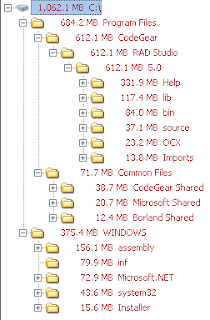
EDIT: Note for self. Short url for this page: http://preview.tinyurl.com/2qdrmz

2007-04-07

Delphi 2007 for Win32: getting rid of .NET help

Note: only do this if you're not using another dev tool for .NET! If your only dev tool is Delphi for Win32 and you couldn't care less of .NET, then go ahead!

Removing the .NET help from Delphi 2007's help turned out to be far easier than I thought it would! Just delete the contents of this folder:

C:\Program Files\Microsoft.NET\SDK\v2.0\Docs\1033

That's for an English windows + English .NET 2.0 SDK, so adjust accordingly.

That's an extra 300+ MB of stuff you're not using anyway, so removing it will stop you from getting .NET results for your Delphi or Win32 searches, making the help experience a bit better.

Also, you can manually fine-tune (delete!) individual files from here:

C:\Program Files\CodeGear\RAD Studio\5.0\Help\Doc\PSDK\

Files such as script56.hxs which will stop you from getting windows scripting results. I wouldn't delete them all, as you may need some, so just delete as you go when you find one that you don't need. You can identify them by the ms-help://borland.bds5/script56/xxxxx displayed in the help browser.

The bold word above is the file name in that folder.

As usual, make a backup before you make changes! Make a full copy of those two folders elsewhere or even on a CD/DVD for later use if needed without requiring re-installing things again...

Disclaimer: it worked for me, in both my main dev machine and a clean VM with nothing + Delphi installed but I can't guarantee it will work for you! :)

Note: after you delete some help files, it will recreate the index again, so next help invocation will be slower while it does so. Subsequent invocations will be speedier than before! :)

[EDIT]: Anders Melander pointed out in the newsgroups a not so drastic option, especially if you need the .NET help around for other products. Although it will not improve the F1 experience, it will help you get less extraneous results when opening the help and performing a "manual" search. Due to some limitations in blogspot, I'll simply link to the newsgroups post and you can work from there. In my experience, I found the 3rd step (regedit) not to be necessary.

2007-04-01

Does Delphi 2007 load fast? Short answer: YES.

This has been a common question in many places, so I decided to share some timings. Unfortunately, I don't have the willpower or time to install other versions just to time them, but, given my computer specs (not that good!) and the times in question, I think many will find this useful anyway.

So, this is my setup:
DELL Latitude D810, Pentium M @ 1.86 GHz, 1 GB/533 MHz RAM, 60 GB 7200 RPM HDD, Windows XP SP2 + updates.

The following times are for a Professional SKU with a full install.

Cold starting with all default packages installed and no third party library:
22.7 Seconds (yes, Twenty-Two Seconds!)

Removing all packages from the default startup, will remove only 3 (three) seconds to that time.

Now, for the interesting part: not only does it shutdown real fast (disappears nearly instantly from screen and from memory within 3.5 seconds), but when it is reloaded, again with all standard packages loading, it takes only 5 seconds (I repeat FIVE SECONDS!).

Now, is that fast, or is that FAST?

So, even if you run into an occasional crash, it still reloads in a flash...

I must make one final note: since I recently reconfigured my system, I'm not yet running an Anti-Virus. When I install one, I'll repeat these tests and update this post.

[EDIT] Just to clarify: this is not an April's Fool Hoax! :)
[EDIT] As promised, here's the results after installing an Anti-Virus (more specifically, Norton's). The splash screen took a full 3 seconds more to show, and the full load took 27 seconds in total, making that just over 4 seconds more than without an Anti-Virus. Of course, using a ton of 3rd party tools spread over a ton of files will probably make the Anti-Virus weight a bit more...

Cutting CodeGear some slack...

For all those against my posts criticizing CodeGear, I have good news: I'll cut CodeGear some slack as I do need to move on and get back to work. However, I'll just make these final notes regarding some comments I received and also to try and further explain why I have been so critic regarding CodeGear. My following posts will be of a more technical nature.

Maybe some people are right and maybe I'm being too harsh on CodeGear, but that's what one gets when a company "where developers matter" turns out to be a company "where management issues matter more than developers".

It's a bit like going to the movies: if everybody tells you that movie X is the best movie ever, what is your reaction when you go and see it and it turns out to be just a good movie? Since we, humans, function in relative terms, the immediate perception you get from that movie is not that it's a just a good movie, but rather that it's a bad movie, because you've set your expectations too high!

I do know that any company needs to make money to keep in business, but would they go out of business if they did not make those first quarter sales? If so, then we're in more trouble than I thought... If they wouldn't go bankrupt by not rushing those sales, why do they do it then? Only CodeGear will be able to tell, but I don't think it was with the developer community in their minds... Also, it's unfortunate that they have to abide by those SOX rules, otherwise they could have just made an aggressive pre-order campaign and still get their 1st Q money without releasing products that were not quite ready...

Sure, the help bug is not that critical: all I have to do is restart the IDE to "fix" it and remember not to press it again, but, when one is being told about an improved help system, how improved does an AV sound when you press F1? That "improved" help is one of the reasons behind many people making the switch to Delphi 2007! And that particular issue was known quite some time before releasing. Sure, in some ways, it's better than BDS 2006, but it still has a lot to go to be nearly as efficient as Delphi 7's help... It's good, but not that much good as many other blogs make you believe it is...

As for the persons behind CodeGear, I've never said anything but that they do go to all the lengths to help you sort your issues. Even though others have had less luck than me, in my contacts with CodeGear staff nearly all were very helpful and helped me sort the problems. It was also my point that they would have less issues if they didn't rush those products out on financial decisions alone.

Final notes:

I've said good things when I feel there are good things to be said, and I do believe that, in time, Delphi 2007 will be much better. It's just sad to see CogeGear turning out to be some "regular" company where numbers matter more than developers.